Monday, February 24, 2014

How to install and start Turbo C++ on Windows 8 x32 / x64

1. Download and install : http://www.windows8downloads.com/win8-dosbox-auifqjbh/
2. Download the Turbo C++ files: http://www.windows8downloads.com/win8-turbo-c–edqfuffj/
3. Create a folder, for example „Turbo“ (c:\Turbo\)
4. Extract Turbo C++ into the Turbo folder (c:\Turbo\)
5. Run the DOSBox from the icon located on the desktop and type the following commands at the command prompt [Z]: mount d c:\Turbo\
Now you should get a message which says: Drive D is mounted as a local directory c:\Turbo\
6. Type d: to shift to Drive D 

7. To run the install type: install.exe   and press 2x Enter                                                                       

8. Enter the Source drive: D              and press Enter to continue            

9. Enter the Source path:  \              and press Enter to continue

10. In directories specify where Turbo C files are copied. E.g.  D:\TC . When done go to start installation and press Enter                                                                                                         

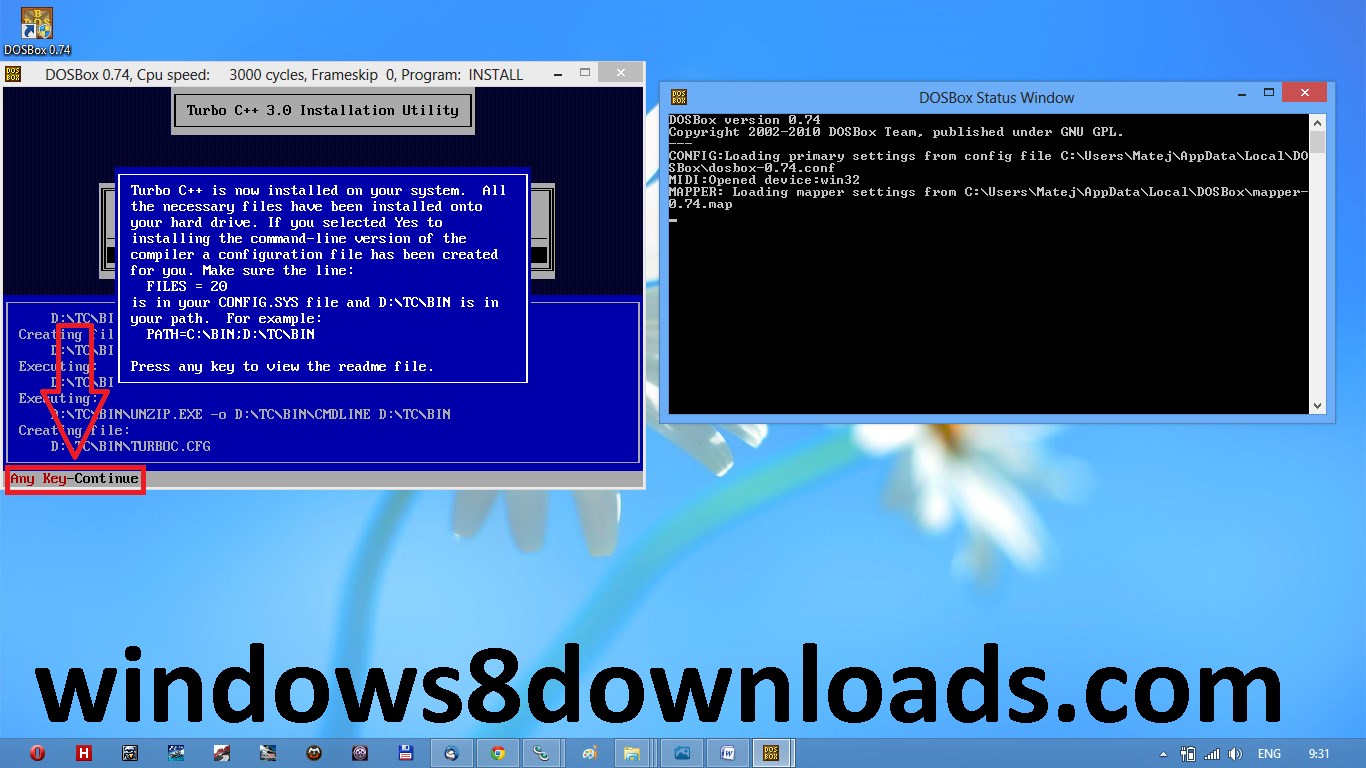
11. Successful installation – press any key to continue to view readme file       

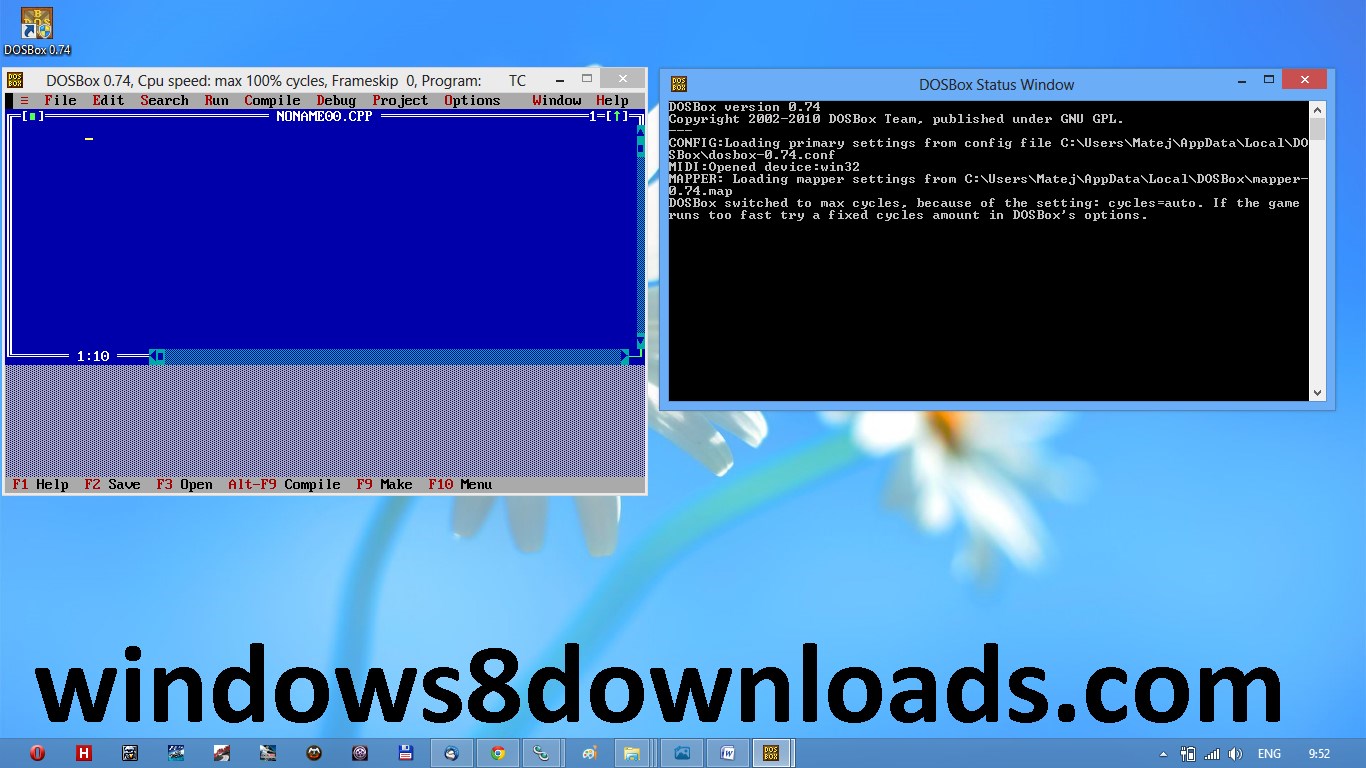
12. Successful installation – to exit press [ESC] and close DOSBox. Installation of Turbo C++ is done

Start TurboC++ in the DOSBox automatically:

1. For DOSBox versions older than 0.73 browse into program installation folder and open the “dosbox.conf” file in any text editor. For version 0.74 go to Metro (press key [WIN]) and click on “DOSBox 0.74 options“.

2. Scroll down to the very end, and add the lines in the picture, save, close and run DOSBox now.
               
3. Automatically mount and start Turbo C++3.0 in DOSBox


Please note:
Full screen: press [Alt] + [Enter]
When you exit from the DOSBox [precisely when you unmount the virtual drive where Turbo C++ 3.0 has been mounted] all the files you have saved or made changes in Turbo C++ 3.0 will be copied into the source directory (the directory which contains TC folder)
Don’t use shortcut keys to perform operations in TC because they might be a shortcut key for DOSBox also. E.g. [Ctrl]+[F9] will exit DOSBOX rather running the code.

How to use [Ctrl]+[F9] (“Run”) without closing down DOSBox
1. press [ctrl]+[F1] while running Turbo C++ to view/change the mapper commands.
2. click on “ShutDown”,
3. then (click) on “del”,
4. then (click) “add”
5. and then press “q” on your keyboard. Then click “mod1″ in the lower left corner to close DOSBox with [ctrl]+[q]
6. click on “save”

Now you can use [ctrl]+[F9] in Turbo C++ as usual and [crtl]+[q] to close DOSBox.

You can do the same with [ctrl]+[F1] (for topic search) by clicking on “mapper” and changing the command as described above.

To reset the mapping, just run the “Reset KeyMapper”-file in the DOSBox folder.

Friday, January 3, 2014

How to modify or remove your online presence

How to modify or remove your online presence
=============================

At www. accountkiller.com, you can get to-the-point instructions on how to remove your account and/or public profile from many popular websites, blogs and networks.

It's all listed alphabetically but you can also search for the ones you want. In most cases, they also provide a direct link that provides more info on account deletion or a simple 'Delete Account' button. Everything is free and you don't need to sign up with account killer either.

Thursday, November 14, 2013

Is Linux Operating System Virus Free?

To be true, No! No OS on this earth can be ever be 100% immune to Viruses and Malware. But still Linux never had a widespread malware-infection as compared to Windows. Why? Let us find the reason behind this.

Some people believes that Linux still has a minimal usages share, and a Malware is aimed for mass destruction. No programmer will give his valuable time, to code day and night for such group and hence Linux is known to have little or no viruses. Had it been true, Linux should be the primary target of Malware infection because more than 90% of high end server runs on Linux today.

Destroying or Infecting one server means collapse of thousands of computer and then Linux would have been the soft target of hackers. So certainly usages share ratio is not in consideration for the above said fact.

Linux is architecturally strong and hence very much immune (not totally) to security threats. Linux is Kernel and GNU/Linux is the OS. There are hundreds of distributions of Linux. At Kernel Level they all are more or less the same but not at the OS Level.

Now suppose a malicious script is written for a RPM based system i.e., RedHat, Fedora, CentOs, it can’t infect a Debian based system and a destructive script written for Debian based OS can’t infect a RPM based System. Moreover a script that is going to perform a system-wide change needs root password.

If root password is confidential and strong enough, the OS is literally secure. Now a windows virus can not contaminate a Linux until Wine is installed and run as root. Hence it is suggested not to run wine as root.

You can not set a Linux System without setting up root password and user password. It means every user in a Linux System must have a password except ‘Guest‘. Where as Windows allow you to set user and even root account without password. A user can not run a program be it install/uninstall without permission provided (sudo) or root password.

But this is not the case with Windows, All windows program can be installed or uninstalled without the consent of root (Administrator). Could you run windows without GUI ? NO! But you can certainly run a Linux without GUI and it remains as much productive as it is with GUI. Actually most of the System Administrator disable GUI as a security concern.

Linux is so much secure in architecture that you even don’t need to go behind a firewall until you are on Network. The access control Security Policy in Linux that is called Security-Enhanced Linux (SELinux) is a set of Kernel modification and user-space tools which implement security policies in a Linux system. Even SELinux is not must for normal users however it is important for users on network and Administrators.

An Open Source Antivirus ‘Clam AV‘ is available for free download and you should install it, if your machine is on Network for comparatively more protection.

Download ClamAV from here: http://www.clamav.net/

Apart from these You can encrypt you disk, use a boot loader password, define and implement a custom boot, custom user roles, etc., makes Linux very much secure. However there are certain threats to Linux System and we will be discussing those here.

The known Linux threats like Viruses, Trojans, Worms and Malware of other kind counts up to 422 in 2005 which gets more than doubled in the recent year with the current count of 863, as reported which is seen as a sign of increasing popularity of Linux as claimed by technical experts.
Some Know Linux Threats

>>Virues
>>Tron horses
>>Local Scripts
>>Web Scripts
>>Worms
>>Targeted Attacks
>>Rootkits, etc.

These days a new trend of cross platform viruses is getting common. Some of the measures one should implement, for Linux System protection:

>>Protect bootloader
>>Encrypt Disk
>>check rootkits on regular basis
>>Protect Root with strong Password
>>Provide correct permission to files
>>provide proper roles to users
>>Implement SELinux
>>Use Antivirus
>>Go behind a Firewall
>>Don’t keep un-necesarry packages and programs (It may result into security Flaw).

Using Linux sensibly is secure enough. Now the question arises if Linux is architecturally so much secure then Android which uses modified Linux Kernel for mobile devices has so much security flaws, Why?

Well Android is developed in Java Programming Language and Java itself is known to have a number of security flaws. Moreover Android is very much in its child stage and will take some time to get matured.


mail.com- Choose your favorite Domain

mail.com offers you a unique and professional email service. Personalize your address by choosing from over 200 domains. Free sign up here:

http://www.mail.com/in-en/

http://service.mail.com/registration.html
Express who you are or what you like. With its innovative webmail system, mail.com provides solutions for personal users, as well as small- and medium-sized businesses. As a web-based provider, mail.com is accessible from any computer providing an internet connection.

Its fresh features and convenience rival those of traditional client-based software which require computer installation.


The Value of a Hacked Email Account


Wednesday, October 16, 2013

Some Important Portals & their Founders

1. Google— Larry Page & Sergey Brin
2. Facebook— Mark Zuckerberg
3. Yahoo— David Filo & Jerry Yang
4. Twitter— Jack Dorsey & Dick Costolo
5. Internet— Tim Berners Lee
6. Linkdin— Reid Hoffman, Allen Blue& Koonstantin Guericke
7. Email— Shiva Ayyadurai
8. Gtalk— Richard Wah kan
9. Whats up— Laurel Kirtz
10. Hotmail— Sabeer Bhatia
11. Orkut— Buyukkokten
12. Wikipedia— Jimmy Wales
13. You tube— Steve Chen, Chad Hurley & JawedKarim
14. Rediffmail— Ajit Balakrishnan
15. Nimbuzz— Martin Smink & Evert Jaap Lugt
16. Myspace— Chris Dewolfe & Tom Anderson
17. Ibibo— Ashish Kashyap
18. OLX— Alec Oxenford & Fabrice Grinda
19. Skype— Niklas Zennstrom,Janus Friis & Reid  Hoffman
20. Opera— Jon Stephenson von Tetzchner & Geir lvarsoy
21. Mozilla Firefox— Dave Hyatt & Blake Ross
22. Blogger— Evan Willams


A complete tutorial about IP Address


Let us begin with IP Addresses.
What is an IP Address?
► An Internet Protocol address is a numerical label assigned to each device (e.g., computer, mobile phone)
that is connected to a computer network that uses the Internet Protocol for communication.
► An IP address is used for two purposes:
1) To identify whether the interface is host or network.
2) To determine the location of the device.
► IP Versions: IPv4 and IPv6.
Although IPv4 is the earlier version, it is the most commonly used version.
► IPv4 is a 32-bit decimal number while IPv6 is 128-bit number.
► IPv4 is normally written as fournumbers between 1 and 255, each separated from the other by a decimal point.
This standard is called as DOTTED-DECIMAL NOTATION.
► Ex: 115.241.40.93
► There are countless IP addresses in today's world!
-------------------------------------------------------------------------
What is the purpose of IP Address Classes?
Each IP Address Class provides the following information:
► Class A: First 8 bits → NETWORK ID & remaining 24 bits → HOST ID
► Class B: First 16 bits → NETWORK ID & remaining 16 bits → HOST ID
► Class C: First 24 bits → NETWORK ID & remaining 8 bits → HOST ID
► Class D: It represents a 32-bit multicast group ID.
► Class E: It is currently not being used. (NO need)
► For example, Let us consider the IP Address 203.43.21.12
We know that it belongs to Class C.Therefore, the NETWORK ID is 203.43.21 and the HOST ID is 12.
 

Monday, September 23, 2013

What Is A Google Dork? How Google Exposes Your Private Info


I have written an article meant for webmasters, so they can protect users from this privacy breach.

Almost every website you visit has a private “virtual notebook”, also known as a database stores everything you do on that website. If you give the site your credit card number or social security number, it is kept in their “virtual notebook”. You leave the site, believing that no one except you can get your information. Unfortunately, the entire world can get any information you’ve entered on almost any website, if your site doesnt hide private information from Google Search. Google Search indexes everything that is made public including “virtual notebooks” and the information stored within that notebook in their search results. If you’ve given a site your credit card number or social security number, then there is a very high chance that site isn’t secure and has that information open to the public then Google will automatically add the info to Google Search.

This information is very easy for anyone to find, especially for cyber-criminals because Google has made it so anyone can do a Google search with the words filetype: and then the extension for “virtual notebooks”.


Photo: What Is A Google Dork? How Google Exposes Your Private Info
=========================================

I have written an article meant for webmasters, so they can protect users from this privacy breach.

Almost every website you visit has a private “virtual notebook”, also known as a database  stores everything you do on that website. If you give the site your credit card number or social security number, it is kept in their “virtual notebook”.  You leave the site, believing that no one except you can get your information. Unfortunately, the entire world can get any information you’ve entered on almost any website, if your site doesnt hide private information from Google Search. Google Search indexes everything that is made public including “virtual notebooks” and the  information stored within that notebook in their search results. If you’ve given a site your credit card number or social security number, then there is a very high chance that site isn’t secure and has that information open to the public then Google will automatically add the info to Google Search.

This information is very easy for anyone to find, especially for cyber-criminals because Google has made it so  anyone can do a Google search with the words filetype: and then the extension for “virtual notebooks”.

List of digital forensics tools

During the 1980s, most of digital forensic investigations consisted of "live analysis", examining digital media directly using non-specialist tools. In the 1990s several freeware and other proprietary tools (both hardware and software) were created to allow investigations to take place without modifying media. This first set of tools mainly focused on computer forensics, although in recent years similar tools have evolved for the field of mobile device forensics.

More tools on:
-----------------
http://en.wikipedia.org/wiki/List_of_digital_forensics_tools


Monday, August 12, 2013

NTLDR is Missing

If your computer suddenly stop working with a message shown in following image and you can’t start Windows, then maybe the file ntldr or ntdetect.com is corrupted or deleted.These files are always located in C:\ . Note that they are hidden system files so if you want to see them, just read this.

Now just follow the steps below.
1. Insert the Windows XP bootable CD into the computer.
2. When prompted to press any key to boot from the CD, press any key.

3. Now that you are in the Windows XP setup menu press the “R” key to repair Windows.

4. Log into your Windows installation by pressing the “1″ key and then Enter.

5. You will then be prompted for your administrator password, enter that password or if you dont have an active password just press Enter.

6. Copy the files ntldr and ntdetect.com to the C:\ ( root directory of the primary hard disk ) . In this example we are copying these files from the CD-ROM drive, which in this case has drive letter “F”. Note that this letter may be different on your computer. For example : if your hard drive has 3 partitions (e.g. C , D , E ) then most likely your CD drive will be F. Just keep in mind that the drives are arranged in alphabetical order.

7. Perform the following commands: copy F:\i386\ntldr C:\
copy F:\i386\ntdetect.com C:\

8. Once both of these files have been successfully copied, remove the CD from the computer and reboot.


Rainmeter a desktop customization platform.


Rainmeter 2.3 build 1304 | 5.23 MB

Rainmeter is a desktop customization platform. Through Rainmeter, you can enhance your Windows computer at home or work with skins: handy, compact applets which float freely on your desktop, much like Windows Sidebar gadgets, or dashboard widgets for the Mac. Rainmeter skins provide you with useful information at a glance. It's easy to keep an eye on your system resources, like memory and battery power, or your online data streams, including email, RSS feeds, and weather forecasts. Many skins are even functional: they can record your notes and to-do lists, launch your favorite applications, and send your tweets to Twitter - all in a clean, unobtrusive interface that you can rearrange and customize to your liking.
-
With Rainmeter, there are no secrets. Our bundled library of open-source skins covers a wide range of functions, but if you want your desktop to do something new, you don't have to wait for us.

Every inch of a skin is completely customizable. Rainmeter skins are written in a simple, elegant language that's easy to learn for anyone who's willing to put in the effort. Skins call upon measures, a set of powerful built-in modules that do all the heavy lifting, and create interactive meters to display that information however you decide. In this way, Rainmeter brings productive innovation together with creative artistry like no other platform of its kind.

Rainmeter can measure:

CPU load
Allocated Memory
Network Traffic
Performance data
Uptime
Free disk space


Download:
http://extabit.com/file/2dva8erbdgujd/Rainmeter.2.3.build.1304.rar
or
http://letitbit.net/download/53102.5afd699d3d14a3289c74691bbee2/Rainmeter.2.3.build.1304.rar.html

HOW TO COPY PENDRIVE OR DVD AUTOMATICALLY

1. open cmd
3. type copy con filename.bat

3. now type "xcopy i: f:\copied /h /s /c /q /i" remove " "
4. type Exit
4. press f6
5. now it will create a batch file named filename.bat

here
xcopy is a command which is used to copy file and folder
i: is the name of your pen-drive drive name replace with your drive name
f:\copied is the name of folder where you wish to copied data is to be placed replace
with your own folder or path
/h is used to copy hidden files also

now copy this file into desktop now whenever someone insert his/her pen drive into your system then click on this file his data is automatically copied into the folder specified by you.

Lock Folder Using Command Prompt & Make Your Own access control

Syntax:
cacls FileName [/t] [/e] [/c] [/g User:permission] [/r User [...]] [/p User:permission [...]] [/d User [...]]

Parameters :
FileName : Required. Displays DACLs of specified files.
/t : Changes DACLs of"0Changes DACLs%2irectory and all subdirectories.
/e : Edits a DACL instead of replacing it.
/c : Continues to change DACLs, ignoring errors.
/g User:permission : Grants access rights to the specified user. The following table lists valid values for permission.

Value Description :
n None
r Read
w Write
c Change (Write)
f Full Control

/r User : Revokes access rights for the specified user.

/p User:permission : Replaces access rights for the specified user. The following table lists valid values for permission.

Value Description
n None
r Read
w Write
c Change (Write)
f Full Control

/d User : Denies access for the specified user.

Chat using IP address

You can try this in your school or college systems(it should be networked systems).
Step 1:
Get the ip address of your friend's system.
if you are using college or school system,then ip address will be in particular range.

Step 2:
copy the following Batch code in notepad:

@echo off
:A
Cls
echo TypeIPAddress
set /p n=IPAddress:
set /p m=Message:
net send %n% %m%
Pause
Goto A

Save the file with .bat extension(For Eg: message.bat)

Step 3:
Open command prompt and navigate to that batch file location.
open the file in notepad.

If you don't know how to move to that path,simply drog and drop in cmd.Then hit enter.

Step 4:
Now it will ask you for the IPAddress.
Enter the IP address which you want to send message.
Hit enter
Now it will ask you for the message.
Enter and hit enter

Note:
The user with whom you connecting system's cmd should be opened in order to receive.

ફોલ્ડર બનાવી જુઓ..

કોમ્પુટરમાં નીચે બતાવેલા ફોલ્ડર બનાવી જુઓ..

1. CON
2. PRN
3. AUX
4. NUL
5. COM1
6. COM2
7. COM3
8. COM4
9. COM5
10. COM6
11. COM7
12. COM8
13. COM9
14. LPT1
15. LPT2
16. LPT3
17. LPT4
18. LPT5
19. LPT6
20. LPT7
21. LPT8
22. LPT9
ટ્રાય કરી? ના બન્યા? તો આ રહ્યો જવાબ:

કમાન્ડ પ્રોમ્પ્ટ પર નીચે બતાવેલ કમાન્ડ ટાઇપ કરો અને જુઓ કમાલ
mkdir \\.\c:\con
આ કમાન્ડ થી c ડ્રાઈવ માં con નામનું ફોલ્ડર બની ગયું હશે. આમજ બીજા ફોલ્ડર પણ બનાવી શકાય.
Photo: કોમ્પુટરમાં નીચે બતાવેલા ફોલ્ડર બનાવી જુઓ..

1. CON
2. PRN
3. AUX
4. NUL
5. COM1
6. COM2
7. COM3
8. COM4
9. COM5
10. COM6
11. COM7
12. COM8
13. COM9
14. LPT1
15. LPT2
16. LPT3
17. LPT4
18. LPT5
19. LPT6
20. LPT7
21. LPT8
22. LPT9
ટ્રાય કરી? ના બન્યા? તો આ રહ્યો જવાબ:
 
કમાન્ડ પ્રોમ્પ્ટ પર નીચે બતાવેલ કમાન્ડ ટાઇપ કરો અને જુઓ કમાલ
mkdir \\.\c:\con
આ કમાન્ડ થી c ડ્રાઈવ માં con નામનું ફોલ્ડર બની ગયું હશે. આમજ બીજા ફોલ્ડર પણ બનાવી શકાય.

Block USB port Using 3 Different Ways:


Many times you might observe that your pen drive is not detecting in cyber cafe or in your college lab or etc places.Have you ever think how it happens??!!!!after reading this post you may got surprised because its very simple trick.
So here is the to block USB ports of your PC.
I have described three Different methods.
You can choose whatever you want.

1:DISABLING THROUGH REGISTRY EDITOR

Three simple steps for this trick.
Step 1)
Open Run window and type regedit and press enter.
Step 2)
nevigate to HKEY_LOCAL_MACHINE\SYSTEM\CurrentControlset\Services\UsbStor
Step 3)
Double click on Start (right side)
change value to 4 and select hexadecimal(if not selected).
Done!!
to enable it:change value to 3.

2:DISABLING THROUGH DEVICE MANAGER

Steps are:
Step 1)
Open Run window
Step 2)
type “devmgmt.msc”
Step 3)
Go To Universal serial bus controller
Step 4)
Select and right click on it and you can find disable option

3:DISABLE THROUGH BIOS

Steps are:
Step 1)
At system startup press DEL or F2 key to open BIOS settings
Step 2)
In BIOS find advance settings or Onboard devices menu(change with BIOS manufacturer).
Step 3)
Find USB configurations and Disable USB controllers to disable all USB ports.
Change it to Enable if you want to enable.

Photo: Block USB port Using 3 Different Ways:

Many times you might observe that your pen drive is not detecting in cyber cafe or in your college lab or etc places.Have you ever think how it happens??!!!!after reading this post you may got surprised because its very simple trick.
So here is the to block USB ports of your PC.
I have described three Different methods.
You can choose whatever you want.

1:DISABLING THROUGH REGISTRY EDITOR

Three simple steps for this trick.
Step 1)
Open Run window and type regedit  and press enter.
Step 2)
nevigate to HKEY_LOCAL_MACHINE\SYSTEM\CurrentControlset\Services\UsbStor
Step 3)
Double click on Start (right side)
change value to 4 and select hexadecimal(if not selected).
Done!!
to enable it:change value to 3.

2:DISABLING THROUGH DEVICE MANAGER

Steps are:
Step 1)
Open Run window
Step 2)
type “devmgmt.msc” 
Step 3)
Go To Universal serial bus controller 
Step 4)
Select and right click on it and you can find disable option

3:DISABLE THROUGH BIOS
 
Steps are:
Step 1)
At system startup press DEL or F2 key to open BIOS settings
Step 2)
In BIOS find advance settings or Onboard devices menu(change with BIOS manufacturer).
Step 3)
Find USB configurations and Disable USB controllers to disable all USB ports.
Change it to Enable if you want to enable.

Monday, August 5, 2013

Facebook: Check your FB setting for the People, Pages, Places Directory


The Facebook People, Pages, Places directory feature (LINK) https://www.facebook.com/directory/people/ has been out now a couple of weeks, however I still find people that don’t know about it. If you were concerned about (hoping for) privacy, well this feature just pretty much ends any and all hope. With the PPP directory Facebook has every user, page, place easily accessible to everyone.

All you need to know is a name (or you can just throw in a fake name if you want to meet strangers). The screen shot below is the current 1st page of the directory..!!

Every user on Facebook is in this directory, and unfortunately (AGAIN!) Facebook does NOT give a way to completely opt out of being listed. However, there is something you can do to limit your visibility in the Facebook PPP directory.

There is now a setting (which seems to be set to Everyone by default) by going to your privacy settings (Top right of page) –> How You Connect (Bottom of page)

Once you are in the “How You Connect” window, you will see as the very 1st choice “Who can look up your timeline by name or contact info?”

Any Facebook user who is still trying to hold out for just that little bit of privacy while still being able to use Facebook will want to change the setting to Friends only, or Friends of Friends if you are ok with privacy middle ground.

Making this change should limit your exposure from the PPP directory. As always its suggested that you look over all the settings under privacy (even make notes if you have a hard time remembering) on a regular basis, you never know when a setting could be changed or added “for your benefit” that you would rather not have.

Photo: Facebook: Check your FB setting for the People, Pages, Places Directory
=========================================

The Facebook People, Pages, Places directory feature (LINK) https://www.facebook.com/directory/people/ has been out now a couple of weeks, however I still find people that don’t know about it. If you were concerned about (hoping for) privacy, well this feature just pretty much ends any and all hope.  With the PPP directory Facebook has every user, page, place easily accessible to everyone.

     All you need to know is a name (or you can just throw in a fake name if you want to meet strangers).  The screen shot below is the current 1st page of the directory..!!

 Every user on Facebook is in this directory, and unfortunately (AGAIN!) Facebook does NOT give a way to completely opt out of being listed.  However, there is something you can do to limit your visibility in the Facebook PPP directory.

     There is now a setting (which seems to be set to Everyone by default) by going to your privacy settings (Top right of page) –> How You Connect (Bottom of page)

     Once you are in the “How You Connect” window, you will see as the very 1st choice “Who can look up your timeline by name or contact info?”

     Any Facebook user who is still trying to hold out for just that little bit of privacy while still being able to use Facebook will want to change the setting to Friends only, or Friends of Friends if you are ok with privacy middle ground.

     Making this change should limit your exposure from the PPP directory. As always its suggested that you look over all the settings under privacy (even make notes if you have a hard time remembering) on a regular basis, you never know when a setting could be changed or added “for your benefit” that you would rather not have.

Guide to IMEI Numbers and Preserving Them on Android


Your IMEI (International Mobile Equipment Identity) is transmitted to the Network provider the moment you switch ON your phone

It is used by your Network to identify the following

1) The first two numbers is RBI (Reporting Body Identifier) = who registered that type of phone
( verify here: http://en.wikipedia.org/wiki/Reporting_Body_Identifier )

2) The next four numbers is TAC (Type Allocation Code) = what type of unit and its complete specifications

3)The next two numbers is FAC (Final Assembly Code) = who manufacture it

example :-

01 AEG
04 Samsung
07 Motorola
10 Nokia
30 Ericsson
41 Siemens
50 Bosch
51 Sony

4) The next six numbers is the Serial Number of the Phone

5) The last number is sort of a check sum, that verifies the previous numbers

Combined a total of 15 numbers is used by your network to get the complete information about your phone that is used against their database of Blacklisted phones and final approval to connect to their network, IF they were inaccurate or had complaints (like being stolen, not paid telecoms dues etc) it will be rejected and BLOCKED immediately from connecting to that Network

You can verify all this by entering you IMEI here

http://imei-number.com/imei-number-lookup/
&
http://www.numberingplans.com/?page=analysis&sub=imeinr

And also here to check if it is blacklisted

http://www.imeidetective.com/englishaparativbazi.php

Your IMEI is also needed for networks to BLOCK your phone when needed as well as ANTI theft apps.

Hence if your IMEI changes or gets lost, it may fail to connect to the network, depending on the restrictions of that network provider.

It is clear that Flashing custom ROMS can cause your IMEI to Change or get deleted as they may be ported from another manufacturer or from another version of the same manufacturer as the IMEI embedded in the chip of your phone.

IF you want to AVOID this problem, safe you EFS folder the moment you think of Flashing any ROM that is NOT the original Firmware for that phone

It is noted that to resolve this problem you have to return to its original firmware to recover your embedded IMEI and do a progressive upgrade . eg. from GingerBread to ICS before going on to Jelly Bean.

Photo: Guide to IMEI Numbers and Preserving Them on Android
======================================

Your IMEI (International Mobile Equipment Identity) is transmitted to the Network provider the moment you switch ON your phone

It is used by your Network to identify the following

1) The first two numbers is RBI (Reporting Body Identifier) = who registered that type of phone 
( verify here: 
http://en.wikipedia.org/wiki/Reporting_Body_Identifier )

2) The next four numbers is TAC (Type Allocation Code) = what type of unit and its complete specifications

3)The next two numbers is FAC (Final Assembly Code) = who manufacture it

example :-

01 AEG
04 Samsung
07 Motorola
10 Nokia
30 Ericsson
41 Siemens
50 Bosch
51 Sony

4) The next six numbers is the Serial Number of the Phone

5) The last number is sort of a check sum, that verifies the previous numbers 

Combined a total of 15 numbers is used by your network to get the complete information about your phone that is used against their database of Blacklisted phones and final approval to connect to their network, IF they were inaccurate or had complaints (like being stolen, not paid telecoms dues etc) it will be rejected and BLOCKED immediately from connecting to that Network

You can verify all this by entering you IMEI here

http://imei-number.com/imei-number-lookup/
&
http://www.numberingplans.com/?page=analysis&sub=imeinr

And also here to check if it is blacklisted 

http://www.imeidetective.com/englishaparativbazi.php

Your IMEI is also needed for networks to BLOCK your phone when needed as well as ANTI theft apps.

Hence if your IMEI changes or gets lost, it may fail to connect to the network, depending on the restrictions of that network provider.

It is clear that Flashing custom ROMS can cause your IMEI to Change or get deleted as they may be ported from another manufacturer or from another version of the same manufacturer as the IMEI embedded in the chip of your phone.

IF you want to AVOID this problem, safe you EFS folder the moment you think of Flashing any ROM that is NOT the original Firmware for that phone

It is noted that to resolve this problem you have to return to its original firmware to recover your embedded IMEI and do a progressive upgrade . eg. from GingerBread to ICS before going on to Jelly Bean.